
Google’s Find Hub
Screenshots
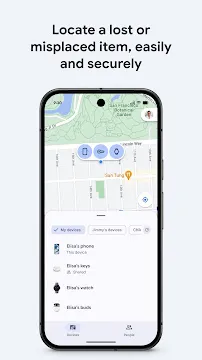
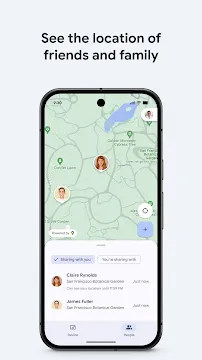
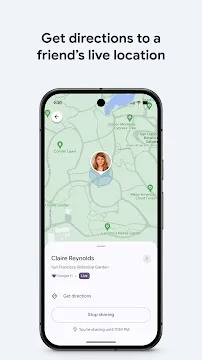
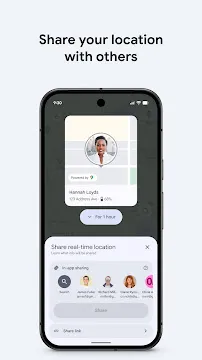
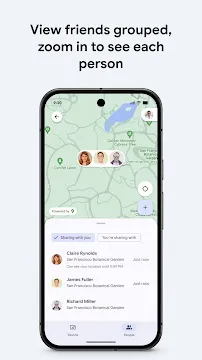
Google’s Find Hub provides a powerful solution for locating lost devices and keeping track of personal items. Losing an expensive smartphone or a set of keys can cause immediate panic. This application simplifies the recovery process by using a vast network of connected devices. It offers a secure way to find, lock, and erase your information remotely. You can also use it to stay connected with friends and family members in real-time. The interface is intuitive and works across phones, tablets, and even smartwatches.
Understanding Google’s Find Hub Technology
Google’s Find Hub operates as an advanced security network for your mobile ecosystem. It replaces the older tracking systems with a more robust and crowdsourced approach. The app uses Bluetooth signals to communicate with nearby devices securely. This means that even if your phone lacks an internet connection, other nearby devices can help relay its location. This collaborative network ensures that your items remain visible on a map almost anywhere.
Privacy is a core part of the design. All location data shared within the network remains end-to-end encrypted. Google cannot see the location of your devices, and neither can the people whose devices help find yours. You are the only person who can unlock the encrypted location using your device PIN or password. This creates a safe environment where users help each other without compromising personal data.
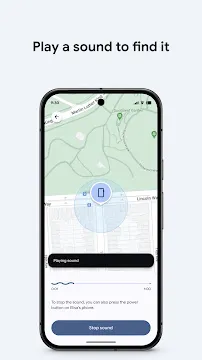
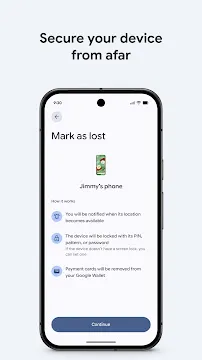
The application does more than just show a dot on a map. It allows you to trigger a loud sound to find a phone hidden under a couch or in a different room. If you suspect the device is truly gone, you can lock the screen instantly. You can even display a custom message for anyone who finds it. This flexibility makes the tool an essential part of your security toolkit.
How to Set Up Google’s Find Hub
Setting up Google’s Find Hub is a quick and simple process. Most users will find it already active if they have a Google account signed in. You should start by opening the settings menu on your primary device. Navigate to the security section and locate the tracking options. Ensure that the toggle to allow the device to be located is active. This is the foundation for all other features.
For the best results, you should enable the offline finding feature. This setting allows the device to participate in the global network of participants. You can choose different levels of participation based on your comfort. Choosing the “everywhere” option provides the highest chance of recovery in both busy cities and remote areas.
- Open the app or web portal.
- Sign in with your primary Google account.
- Select the specific device from the list.
- Check the battery level and network status.
- Verify that your screen lock is active for encryption.
Once the setup is complete, you should perform a test run. Try playing a sound on your phone from a separate tablet or computer. This confirms that the connection is active and working correctly. If you have accessories like earbuds or tracker tags, you can add them to the list during this stage.
Exploring the Features of Google’s Find Hub
The features of Google’s Find Hub extend beyond simple tracking. One of the most useful additions is the ability to share locations with trusted contacts. You can share your live movements with family members during a trip or a late-night commute. This temporary sharing helps everyone stay informed and safe. You can stop sharing at any time with a single tap.
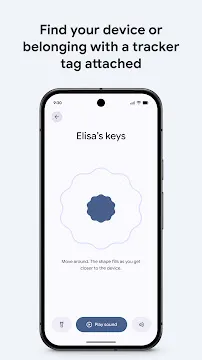
Another major feature is the support for hardware tracker tags. You can attach these small tags to your luggage, keys, or even a bicycle. The app displays these items alongside your phones and tablets. If you lose your bags at an airport, the community network helps pinpoint their location. This makes the app a comprehensive center for managing all your physical assets.
For users with modern flagship phones, the tracking works even when the battery dies. Some devices can continue to send signals for several hours after powering off. This critical window provides a last-chance opportunity to find a stolen or lost phone. The app also includes “Precision Finding” for certain models. This guides you with directional arrows when you are within a few feet of your item.
Privacy and Data Protection in Google’s Find Hub
Security is the most important aspect of Google’s Find Hub. Many people worry about being tracked by strangers or the service provider. The app addresses these concerns with strict encryption protocols. Every location report sent by the network is scrambled. Only your specific security key can decode that information. This ensures that your movements remain private.
The system also prevents unwanted tracking. If someone else’s tracker tag moves with you for an extended period, the app will alert you. This safety feature protects users from stalking or unauthorized monitoring. You can then use the app to find the unknown tag and disable it. Google has built these safeguards to ensure the technology is used only for its intended purpose.
- Encryption keys stay on your personal devices.
- Google does not store your unencrypted history.
- Unwanted tracker alerts keep you safe.
- You control who sees your live location.
- Remote wipe options protect your banking and personal data.
When you use the remote erase feature, it removes all content from the device. This is a final step if you believe you cannot recover the phone. It prevents thieves from accessing your photos, emails, or apps. Even after a wipe, some devices can still be tracked using the hardware-level identifiers.
Troubleshooting Google’s Find Hub Connections
If you encounter issues with Google’s Find Hub, start with the basics. Check if your location services are active in the main settings. Sometimes, battery-saving modes can disable the Bluetooth or GPS needed for tracking. Ensure that the app has all the necessary permissions to run in the background. Without these, the device cannot report its position accurately.
Another common problem involves multiple Google accounts. Ensure that you are signed in with the same account on both the lost device and the one you are using to search. If the device does not appear, it might have been disconnected from the account. Regularly checking your device list helps prevent this surprise.
If the location is not updating, the device might be in a dead zone with no signal. In these cases, the app shows the last known location. Check the timestamp to see how recent that information is. If you are using the web version, try refreshing the page or clearing your browser cache. A fresh login often fixes sync issues between the server and your handheld devices.
Conclusion
Google’s Find Hub is a revolutionary tool for modern device management. It turns a stressful situation into a manageable task. By combining a global network with high-level encryption, it offers both performance and privacy. Whether you are looking for a misplaced phone or tracking your travel luggage, this application provides the necessary tools. The ability to share locations and secure your data remotely adds immense value. Set up the service today to enjoy the peace of mind that comes with knowing your devices are always within reach.